 On-Page SEO Checker
Catch on-page SEO issues before you publish.
Review crawl access, headings, and links in Chrome’s side panel alongside the page you’re editing.
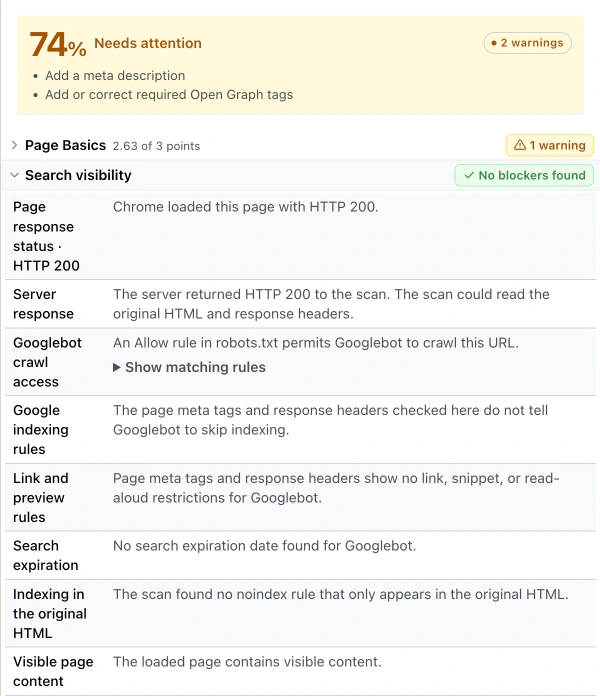
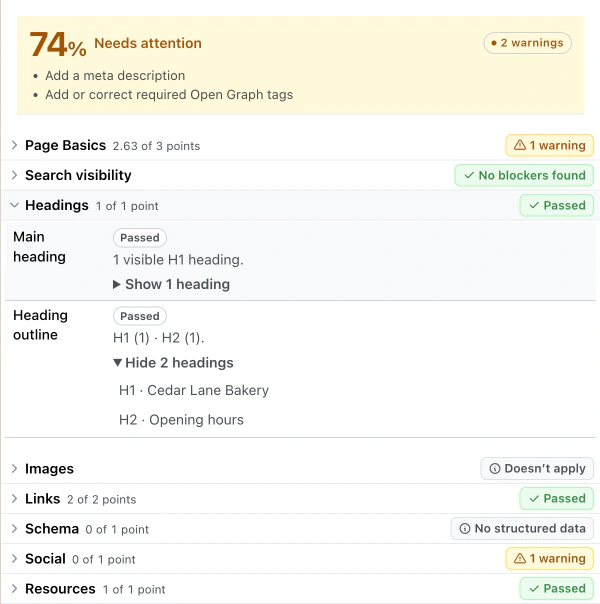
On-page SEO checklist
Google Search Essentials is Google’s current name for its Webmaster Guidelines. The table shows which signals the extension can check on the page you have open.
Read search visibility first. A page can score 100% and still block Googlebot. The extension scores seven categories on a 10-point scale using only the checks it can verify.
| Check | What the extension looks for |
|---|---|
| Search visibility Visibility status only | |
| Page response | Reads the HTTP status Chrome received. A 200 passes. A 204 (no content), 4xx error, or 5xx error blocks this scan. |
| Server response | Requests the same URL without cookies. If the response cannot be matched to the open page, the report marks the affected checks as unverified. |
| Googlebot crawl access | Reads the site’s robots.txt rules to see whether Googlebot may fetch this URL. A matching block stops crawling. |
| Indexing rules | Looks for noindex or none in meta tags and response headers. These tell Google to leave a page out of Search when it can crawl the page and read the rule. |
| Original HTML | Compares the original HTML with the rendered page. Flags a noindex rule that JavaScript removed, since Google may see it before scripts run. |
| Search expiration | Reads the unavailable_after date. Shows a future deadline and flags a date that has already passed. |
| Link and preview rules | Shows robots directives that restrict link following, snippets, or read-aloud features. Warns when instructions disagree. |
| Visible content | Flags an apparently empty page, or a page that returns 200 but has a title such as “Page not found.” |
| Page basics 3 points | |
| HTTPS | Checks the final page address. HTTPS passes. Plain HTTP raises a critical issue. |
| Page title | Checks for a nonblank page title. Shows its length and flags generic wording such as “Home” for review. |
| Canonical URL | Checks that HTML and response headers declare one consistent preferred URL. A missing, invalid, or conflicting declaration raises a critical issue once confirmed. URLs with a # fragment also fail. |
| Meta description | Checks for a nonblank description and shows its length. There is no character-count target. |
| Page language | Checks that the HTML element declares a valid language tag, such as en or en-GB. |
| Headings 1 point | |
| Main heading | Looks for at least one visible H1 or equivalent level-one heading with an accessible name. Multiple H1s can pass. |
| Heading outline | Lists headings in page order and shows skipped levels. A visible section heading below level one with no accessible name fails the check. |
| Images 1 point | |
| Image alt text | Checks whether each image has an alt attribute. A missing attribute fails. An explicitly empty one passes and can be appropriate for decoration. |
| Oversized images | Flags a displayed raster image only if its response body exceeds 100 KiB and its source is more than twice as wide as the display needs, accounting for screen density. |
| Links 2 points | |
| Link destinations | Checks navigation links for a usable web address. Flags missing addresses and placeholders without visiting the destinations. |
| Link text and labels | Checks that each exposed link has an accessible name, including image and icon links. Generic text such as “click here” gets a suggestion. |
| Share of external links | Counts links to other pages. The extension flags a share above 50% pointing to other hostnames, including subdomains. |
| External links per 2,000 words | Flags more than five external links per 2,000 visible words. Both link thresholds are the extension’s own benchmarks. |
| Structured data 1 point | |
| Supported types | Checks structured data for supported WebPage and BreadcrumbList entries. WebPage needs a name or usable URL. BreadcrumbList needs an item list. Confirmed absence earns zero here. |
| JSON-LD syntax | Tries to parse every JSON-LD block and identifies any block with invalid JSON. |
| Breadcrumb items | Checks for at least two breadcrumb items with names, distinct positive positions, and usable URLs. The last item may omit its URL. |
| Social previews 1 point | |
| Open Graph | Checks the public HTML for a title, type, page URL, and image URL. Both URLs must be absolute web addresses. A missing description gets a suggestion. |
| X cards | For declared summary cards, checks the card type, title, and any supplied image URL. A large-image card needs an image. Open Graph fields can supply missing values. |
| Page resources 1 point | |
| Scripts and stylesheets | Checks the load status of external scripts and active stylesheets where Chrome exposes it. Flags confirmed HTTP errors and marks unknown results as unchecked. |
| Parser-blocking scripts | Checks the original HTML for external scripts in the page head that make the browser pause while building the page. |
| Page load time | Times this visit through the browser’s load event. The extension’s target is three seconds or less. |
Pricing
Proposed plans. Paid access is currently unavailable.
Monthly
€5
per month
Yearly
€39
per year
Lifetime
€99
one-time payment